Taking Product Photos

Taking Product Pictures

Product pictures for your small business web design are extremely important. To take good quality pictures, you should invest in a few simple items and use them for all of your pictures.

1. Background Mats

Go to Staples and buy two 20 x 30 inch foam display boards, commonly used in sales booths and office presentations. Choose a medium grey (works for all) or perhaps dark blue (unless your product is blue). White may not be a good choice because then the brightest part of your picture will likely be the background.

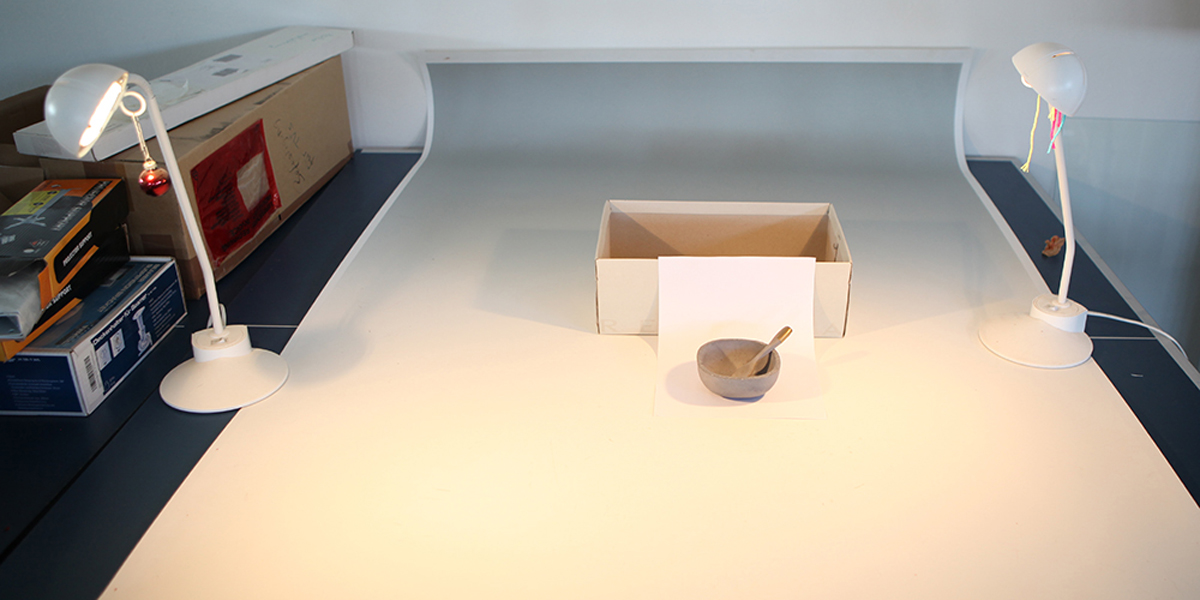
Prop up one board vertically against the other which is horizontal. Now you have a grey bottom surface to place your product on, and you also have a grey background.

2. Buy a Professional Setup

If your budget permits, you can buy a complete table-top shooting kit from suppliers such as Jessops. The setup will include a pair of light sources, a light shed (into which you place your product), or a light table.

3. Product Positioning – Use a Tripod

You should use a tripod. The lens should be at the same height as middle of the object. If you hold the camera in your hand, one picture may be focused on the top, one far away, one too close, one to the side, etc. You want product pictures to be consistent.

Mark the exact spot on the bottom mat where each product should be placed, then take your pictures. This way, pictures of three products that may come in different colours come out exactly the same except for just the colour.

4. Cropping

Do NOT tightly crop the picture. The product should be in the centre of the frame with some background colour visible on all sides.

5. Product Lighting

You should use fairly intense lighting on your subject. This forces the camera to use a small aperture so that all portions of the product are in focus. To get started, you can buy two identical halogen desk lamps with 50 watt bulbs (or equivalent if using LEDs). Higher intensity light sources are better because your camera will use a smaller aperture and give you more depth of field. Place the light sources on the left and right sides of your product at about 60 degrees from the front.

Use a diffused light source for better results, as it eliminates harsh shadows. To do this,  just place a sheet of printer paper in front of each lamp, holding it in place with clothes pins.

On my mobile

Mercia Hosting. Website design and hosting for small businesses

It’s relatively difficult to understand how Google’s recent algorithmic change which placed wholly more importance on mobile before took anyone by surprise. It’s been common knowledge for years that mobile was and is still taking over as the world’s primary web access method – how this could have slipped the attention of any webmaster is unfathomable to say the least.

With over 50% of all Google searches happening by way of mobile, it’s really no longer a case of doing things just because the powers that be tell you to. Instead, it’s about making sure you not only reach your target audience, but also that your ecommerce business gives them everything they need regardless of their method of access. And while all web businesses will vary by way of niche, direction and thus the most appropriate approach to take, there are certain hard and fast rules that apply to all ecommerce ventures now more than ever before. what-mobile-friendly-means-for-e-commerce-websites

1 – Multi-Platform Support

These days, it’s not uncommon for the same person to have an Android smartphone, a tablet PC running iOS and their partner to have a Windows Phone. In such instances, there’s nothing more frustrating than coming across an ecommerce site that works fine on one or two, but is wholly unusable on the other. It just smacks of laziness and gives the impression that you don’t give a damn about a gigantic proportion of your target market, so if you plan to go mobile these days, you need to make the effort to support all popular platforms.

2 -Simplified Text

Something else to bear in mind is the way in which mobile device users are generally even less inclined to read ream after ream of text than their desktop web access counterparts. As such, it’s imperative that you cut to the chase and get to the point of what you want to say immediately, saving longer explanations and details for a slightly later stage. If they can’t immediately see what they want, they won’t hang around.

3 – Page Complexity

Something else to be very much aware of is page complexity, which in its own right has the potential to make or break your site. You have to bear in mind that those looking to shop with you may not only have a comparatively low-end mobile device, but may also have a pretty poor signal at the time. The more complex the page, the lower the chance they’ll stick around long enough for the thing to load up. For the mobile crowd, simplicity sells…big time.

4 – Ease of Navigation

There’s very little more infuriating than trying to hit a link that’s no more than 1mm in height on a tiny touchscreen only for the site to keep registering your touch as hitting the link below. Poor quality navigation is outright suicide for ecommerce websites as given the amount of clicks needed and data to be entered, those encountering these kinds of annoyances simply will not bother.

5 – Impulse Purchases

Last but not least, it’s of critical importance to remember that a vast proportion of mobile ecommerce sales happen by way of unplanned impulse purchases made on a whim. From commuting to work to sitting on the toilet to waiting for buses and so on, billions of pounds are spent annually on these kinds of buys. As such, for the sake of your own business it’s a good idea to make sure that from landing on the first page to making a purchase is a process that can be completed in no more than about 3 minutes. The longer and more complicated you make the shopping experience, the lower the chance of your own ecommerce site scooping up those often highly lucrative and uniquely frequent impulse purchases.

Domain name choices

Mercia Hosting. Website design and hosting for small businesses

So the rulebook on how to choose a solid domain name is getting bigger by the day, but at the same time so too is the list of mistakes being made by those who think they know better. Some are undoubtedly more painfully obvious than others, but in all cases it’s pretty amazing how making just a couple of rookie errors can send you and your website completely down the wrong garden path.

Here’s a quick overview:

Underestimating Domain Name Importance – If you, for one second, think that the domain name you choose is something of a secondary issue of importance to your site, you’re already on a downward spiral. You’ll regret it in a big way later on, so don’t ever take it too lightly.

Not Thinking Ahead – You may only be able to serve a small locality for the time being, but what about in the months and years to come? If you’re thinking of including a town, city or region in your domain name, try to make it one that will remain valid for quite a while at least.

Compromising – If when looking for a domain name you go for one that ‘will do’ as opposed to one that’s ideal, you’re selling yourself short in a big way. The best name might be harder to find and costs more, but could also be worth its weight in gold.

Ignoring Taken Names – So you’ve found that the perfect domain name for your business is already taken, so what? Most of the time, domain name owners are more than willing to sell on their assets for the right price, which might not be as much as you’d think.

Small Focus – Sure, you have a primary and secondary domain name choice in mind, but what if the first five you liked the idea of are all unavailable? Unless you think ahead and map out a whole bunch of potential domain names, you’ll end up going for pretty much anything when you find your first choices are already taken. So write some down before you start.

Forgetting Trademarks – If you end up buying a domain name that infringes on some other trademark or copyright, you’re heading for a rather large legal headache. Before buying, have a look around to make sure you won’t be treading on any toes.


Weird Spellings – If the domain “booksforyou.com” is taken, don’t think you’ll do just as well with “bookz4Yoo.com”. It might technically sound the same when read out loud, but these kinds of weird spellings are nothing but trouble when it comes to getting folk to remember them and not go straight to your rivals.

Not Looking Abroad – And finally, it’s never a bad idea to take a quick look at the domain name you’re interested in to find out whether or not it might have a double-meaning. From slang expressions to foreign languages, it’s all well and good coming up with a catchy brand name but not if when read by international customers it’s something vulgar, insulting or in any way contrary to your brand’s purpose and nature.


.UK domain names

Mercia Hosting. Website design and hosting for small businesses

If you currently own the .co.uk domain name and now you hear that the .uk domain name was launched on the 10th June this year and providers are offering it for sale.
What should you do?

First off, let’s look at a few facts:

The new .uk domain has been automatically put by for you up until 19/06/2019. Not only does this apply to .co.uk it’s also for those owning .org.uk, .me.uk, .net.uk, .plc.uk or .ltd.uk domain names. So, there is no need to panic buy! Just as long as the domains remain registered the .uk will be reserved for you.

For some of you there will have been more than one domain that existed before the cut off date which shared the same website name as yours but had different domain name endings (i.e. www.mywebsite.co.uk and www.mywebsite.org.uk). You can check whether you have the rights to the new .uk by using the Rights lookup tool.

If you decide not to register the new .uk equivalent domain before 10 June 2019, it will then become available for someone else to register, but your existing domain will of course still be yours as long as it remains registered to you.

If at any time you decide not to renew your existing domain, the .uk equivalent will automatically become available for someone else to register.
Price wise, it looks like they’ve come down a bit recently and the cost to register for one year is now only £2 more for a .uk than a .co.uk.  If you think you have a registered business name you want to protect, then its worth it, but you have time.

Taking pics for your website

General Website Pictures

1. Take Low Resolution Pictures

That’s right, low resolution. Taking pictures for websites is different from taking pictures used to make prints. Website pictures are generally taken at 72dpi (dots per inch). This means that even a 640 x 480 picture is fairly large.

You can probably set your camera for as low as 1280 x 960 pixels or equivalent. If you do not, the result will be a larger file size that will slow down how fast your web page displays. As a guide, the pictures on this page are only 248 x 164.

Regardless of the resolution you choose, edit your pictures so they are the exact size needed on your web page, then upload them. Consider compressing them if they are JPEG (.jpg) images. You do this by setting the image quality when the image is saved. If you need a free and very capable photo editor, try http://www.getpaint.net/

2. Lighting

Make sure the pictures you provide are well-lit. Generally, avoid the use of flash unless it is used as fill-in flash. The main source of lighting should not be behind the subject (e.g. a bright window behind the subject). You do not want dark pictures with low contrast.

3. Focus and Composition

All digital cameras take pictures that are in focus, but is the focus on what you want? If you are taking a photo of a person, you may want the background to be out of focus so that it is not distracting. Avoid taking long-distance shots of groups of people. Nobody is going to look at their feet. Take close-ups.

Likewise, if you have a shop, a picture of the shopfront or an interior isle might be nice, but also take close-ups of individual counters, wall displays, and racks so that visitors can clearly see the kinds of merchandise you offer.

4. Perspective

If you are taking pictures of people, lower your camera (bend down) so that your camera is at chest height, not at the height you would be at if you were standing up. This is the trick that wedding photographers use to take such attractive pictures.

5. Camera Colour Temperature Setting

Regardless of what kind of pictures you take, the camera should be set to match the light source.

Do not depend on your camera selecting this setting automatically.

You should manually set your camera to the colour temperature of the light source so that colours are accurate. i.e. Sunlight, Cloudy, Incandescent, Fluorescent, etc. All cameras have such settings.

Facebook or Website ?

Facebook recently announced there are currently 40 million active small business pages on its service, which shouldn’t come as that big of a shock to anyone. Creating a Facebook business page is free and provides you with access to a user base roughly the size of the population of China.

Armed with this knowledge, it is reasonable to assume that many small business owners would forgo the effort of building a website and simply rely on what the largest social media network of all time can give them at no cost. But is a Facebook page really enough?

Well, let’s explore that idea. A Facebook business page does have some limitations. Granted, it’s an excellent way to engage with your user base, as long as they want to engage with you. If you can get someone to “like” your page, that’s great. You’ve clearly shown enough value to your customer that they want to hear more about what’s going on with your business – at least in the short term.

However, if someone begins to grow weary of seeing your posts, doesn’t engage with them, and stops visiting your page to learn about the latest goings-on, Facebook will begin to take your posts out of your previously-engaged customer’s News Feed. Once that happens, you need to start paying to promote posts to people who have liked you, or begin advertising (which of course, isn’t free) to engage new users.

Another limitation to a Facebook business page is a lack of brand control. Yes, you can put your background photo on it, and yes, you can have your logo as the profile picture. Your posts have your voice and the photos show off who you are and the services you provide. But it’s still a Facebook page and will never give the complete brand experience that a dedicated website will.

Also, valuable information isn’t always readily available right when a user lands on the page. Your address may be there, along with your phone number and a Yelp page, but that isn’t necessarily enough. Many potential customers want to learn a little more about who you are and what you’re about. In comparison, a dedicated website enables you to completely control your brand and acts as a main hub on the web where interested, potential customers can go for all the information they’re looking for.

A dedicated website also has Google search on its side. It’s true a Facebook page can be found via a search engine, but it doesn’t provide the same comprehensive SEO control of a dedicated website. This point should not be overlooked. A website enables you to tailor your content to the exact kind of phrases and keywords your potential customers are searching for, compared to a Facebook page that is limited in this aspect. Showing up as highly as possible in online searches is a critical component of any business’ acquisition strategy.

In short, should you have a Facebook page for your small business? Yes, absolutely. It’s free and it’s brand exposure. Is it enough? Probably not. To create the kind of digital presence that is required for a small business to succeed in today’s world, a dedicated website isn’t a nice-to-have, it’s a necessity.

Your first website..???

Mercia Hosting. Website design and hosting for small businesses

Don’t know a blog from a website from social media platform? Are you ready for your first business website but don’t know how to get started?

Having a professional, comprehensive website is important for pretty much every new business. But getting started can seem intimidating for those who have never had their own website before. Below are tips for building your first business website.
Have a Clear Goal
Every small business website is different because every one serves a different purpose. If you want your first business website to be a portal for people to buy products, you need to build it around that goal. If you want it to provide information and entice potential clients to call you, you have to build it with that goal in mind. A website without a clear purpose will only cost you time and money while providing little, if any, benefit.

Write Your Own Content
Before getting started with building your first business website, you should decide, at least in basic terms, what you want it to say. According to Emily Bracket, president of design and branding firm Visible Logic, the website owner should at least start the content creation for their own site. Even if you plan to hire someone to edit or polish it, you know the basic message of your company more than anyone else will.

State Your Purpose Clearly and Quickly
You do, however, want to make sure that the written content of your website isn’t too long-winded. Website visitors don’t often spend a lot of time reading through pages of content just to find basic information. So make sure that the important points about your company and its offerings are very clear and easy for visitors to find.

Tell Customers What You Can Do for Them
It can also help to try reading your content as a potential visitor. A common pitfall she sees among new website owners is a tendency to focus on what they do, rather than what benefit they provide to customers or clients.

Utilise Calls to Action
Another way to make your goals very clear to visitors is to utilize calls to action. Do you want them to sign up for your newsletter? If so, add a form on your main page. Do you want them to shop through your new collection of products? Tell them so.

Develop a Page Hierarchy
Almost all business websites include at least a few different pages. You might choose to go with a very simple format, including a home page, about page and contact page. Or you might want different pages for your different services, with a main services page that offers a general overview. That’s something you should decide on, or at least consider, before building or hiring someone to build your site.

Draw Inspiration
If you’re unsure of how you want your first business website to look or how you want your content to read, look around for some websites that you really like. Don’t copy them, of course. But looking for some outside inspiration can help you get an idea of what you want from your new site.

Professional Website > Personal Accomplishment
Small businesses strapped for cash might want to go the DIY route for their first business website. While some have done this successfully, it’s tricky for a new business owner.
“I hear it all the time from business owners who tried to build their own websites. They felt so proud and it was such a great learning experience. But the fact is that customers don’t care what a great learning experience it was. They only care that your website looks professional. So even if you worked really hard on it, if it doesn’t look professional it can be detrimental to your business.”

Own Your Domain
We also recommends that all businesses purchase an actual domain name. Some providers offer free ones that come with extensions. But yourbusiness.co.uk tends to be more professional and easy to remember than yourbusiness.freewebite.freehosting.com.

Consider Future Growth
However, if you plan or hope to grow your business quickly, think carefully before choosing a low-cost platform aimed at very small sites. Platforms like Wix and Squarespace can work great for businesses that plan to stay relatively small and use just a few features. But if you ever outgrow them, transferring all of your site content to a new host can be a pain.

Add a Face
One of the common elements of many popular small business websites, is a photo of the founder or the team:

“A lot of times with new businesses or website owners, they want to try and make their businesses look big. But that’s not always beneficial. A lot of customers want to know that there’s a real person who’s going to be working with them. So including a good photo of yourself or your team is almost always a good idea.”

Tell a Personal Story
Another way to make people feel more connected to your business through your website is to tell your story:

“It’s really nice to include a story about yourself or why you created the business in the first place, as long as that reason is something more than just ‘to make money.’ If you started the business to help people or if there was a specific thing that happened that led to your business idea, people love stories like that.”

Set Up Easy Contact
With very limited exceptions, every business website, no matter the type or size, should include contact information. This can be an email address, phone number, address, social accounts, or all of the above. The more ways you give people to contact you, the more likely they are to feel comfortable reaching out.

Always Include a Contact Form
When deciding which types of contact information to provide, a contact form should always be included. Sometimes people are looking to get in touch but they don’t have access to their main email program or just can’t click on your email link for whatever reason. A contact form makes it easy for people to send a message no matter where they are or what kind of device they are using.

Make Text Easy-to-Read
Since the text of your site is likely what’s providing most of the relevant information to your visitors, it’s important that they can actually read it. Basic typefaces, like those that your designer or theme are likely to suggest, are best for readability. So don’t go changing all of your fonts to fancy lettering just because you think it looks cool.

Add Valuable Images
Visuals like images can also go a long way for adding interest to your first business website. Some ideas for relevant images include team photos, examples of your work, and even relevant stock images.

Include Customer Testimonials
Customer testimonials can be another great element of a lot of business sites. If your business is brand new, work on getting some quality testimonials first, rather than just publishing bland, generic recommendations. But even a few text blocks from customers can help build your credibility.

Insist on a Mobile Site
But no matter what type of content you decide to include on your website, make sure that the site itself is responsive or mobile friendly. Having a site that isn’t mobile optimized can drive away customers, hurt your SEO and look unprofessional.

Research SEO
SEO is a concept you’ll have to keep in mind throughout the entirety of running your website. Your designer should be able to help with the basics at first. But over time you’ll likely want to educate yourself about some of the concepts so that people can easily find you online.

Learn as You Go
Once your first business website is live, the process is far from over. You’ve made a great first step. But a company’s website is never really complete. Add or change elements as your business grows and changes. Adapt to things like SEO and mobile designs. And always remember to keep your customers’ needs and wants in mind when it comes to your first business website.